

How to Create an Academic Website Without GitHub Pages
Turn your academic CV into a research website with Self. Use Ingrid Mases Solé's example to organize your introduction, experience, publications, and links.

Javier Martínez Samblas
Founder of Self · AI-powered resume-to-website platform

Self turns your academic CV into a professional website, with hosting included and content you can customize in Studio. Upload your CV, choose a template, shape the page around your research, and publish your page at a self.cv address. You can introduce your work online without setting up a GitHub repository or configuring a site theme.
For a PhD student, postdoc, or scientist, the useful question is what a prospective collaborator or selection committee should understand first. This guide uses Ingrid Mases Solé, an accelerator-physics researcher, to show how a CV can become a clear research profile.
What should an academic website include?
An academic website should explain your research focus, show the experience behind it, and give readers direct routes to your work and contact details. Start with a clear introduction, then arrange the supporting evidence around the people you want to reach.
Research introduction
What to include
Your field, current focus, and affiliation
Purpose for the reader
Understand what you investigate
Research experience
What to include
Roles, research questions, methods, and your contribution
Purpose for the reader
See how you approach scientific work
Selected publications
What to include
Titles, venue, year, and DOI or paper links
Purpose for the reader
Open the work supporting your experience
Education and methods
What to include
Relevant degrees, specialist training, and technical tools
Purpose for the reader
Understand your preparation and capabilities
Teaching and other work
What to include
Supervision, courses, service, or public projects where relevant
Purpose for the reader
See the breadth that matters for your next step
Contact and professional links
What to include
A contact route and relevant scholarly or code profiles
Purpose for the reader
Continue reading or start a conversation
| Section | What to include | Purpose for the reader |
|---|---|---|
| Research introduction | Your field, current focus, and affiliation | Understand what you investigate |
| Research experience | Roles, research questions, methods, and your contribution | See how you approach scientific work |
| Selected publications | Titles, venue, year, and DOI or paper links | Open the work supporting your experience |
| Education and methods | Relevant degrees, specialist training, and technical tools | Understand your preparation and capabilities |
| Teaching and other work | Supervision, courses, service, or public projects where relevant | See the breadth that matters for your next step |
| Contact and professional links | A contact route and relevant scholarly or code profiles | Continue reading or start a conversation |
Example: Ingrid's academic CV becomes a website
Ingrid's published profile connects physics and mathematics studies with accelerator research at Goethe University Frankfurt and CERN. It describes work on high-intensity beams, beam-dynamics simulations, and experimental measurements, alongside technical skills and four linked conference publications.
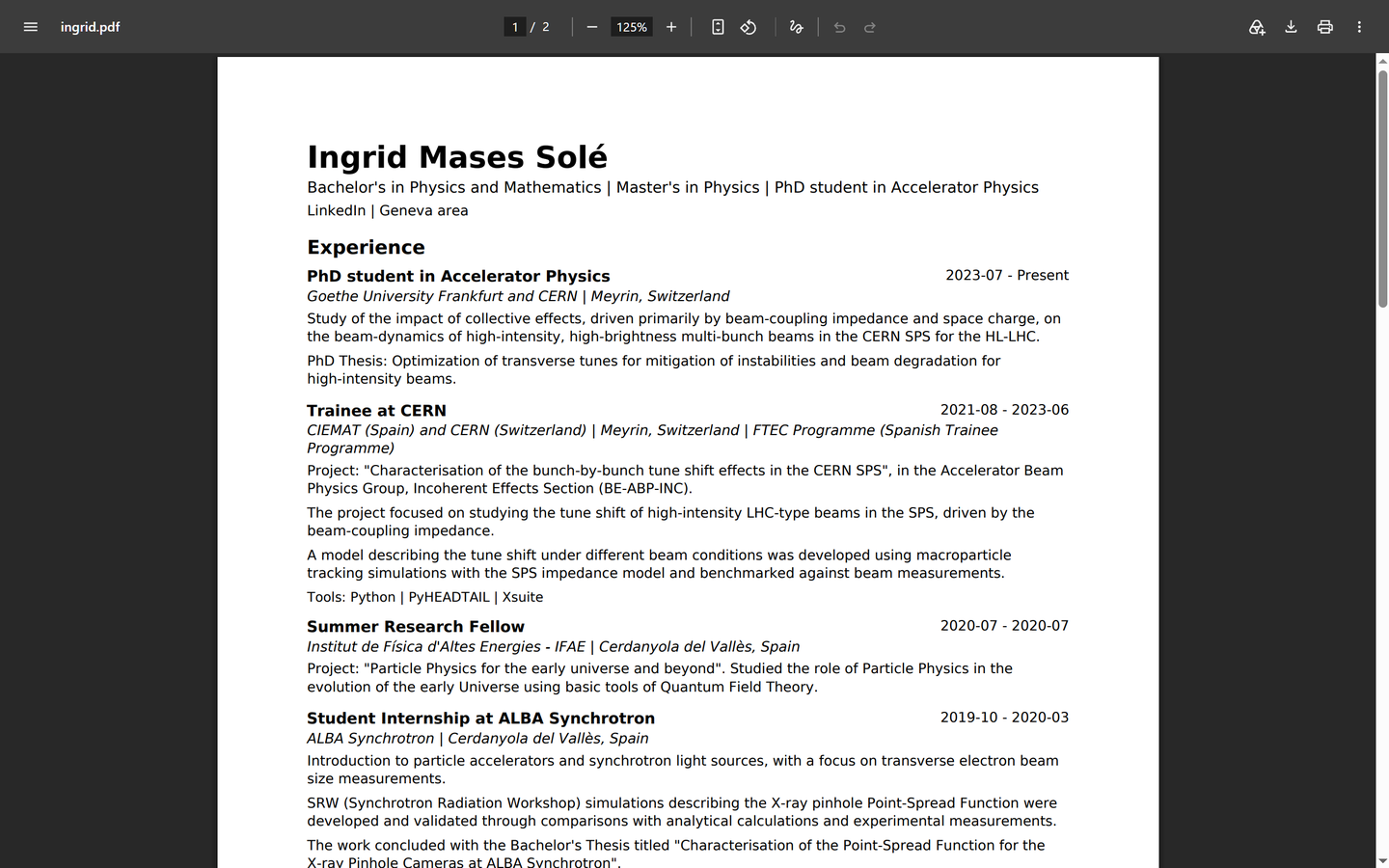
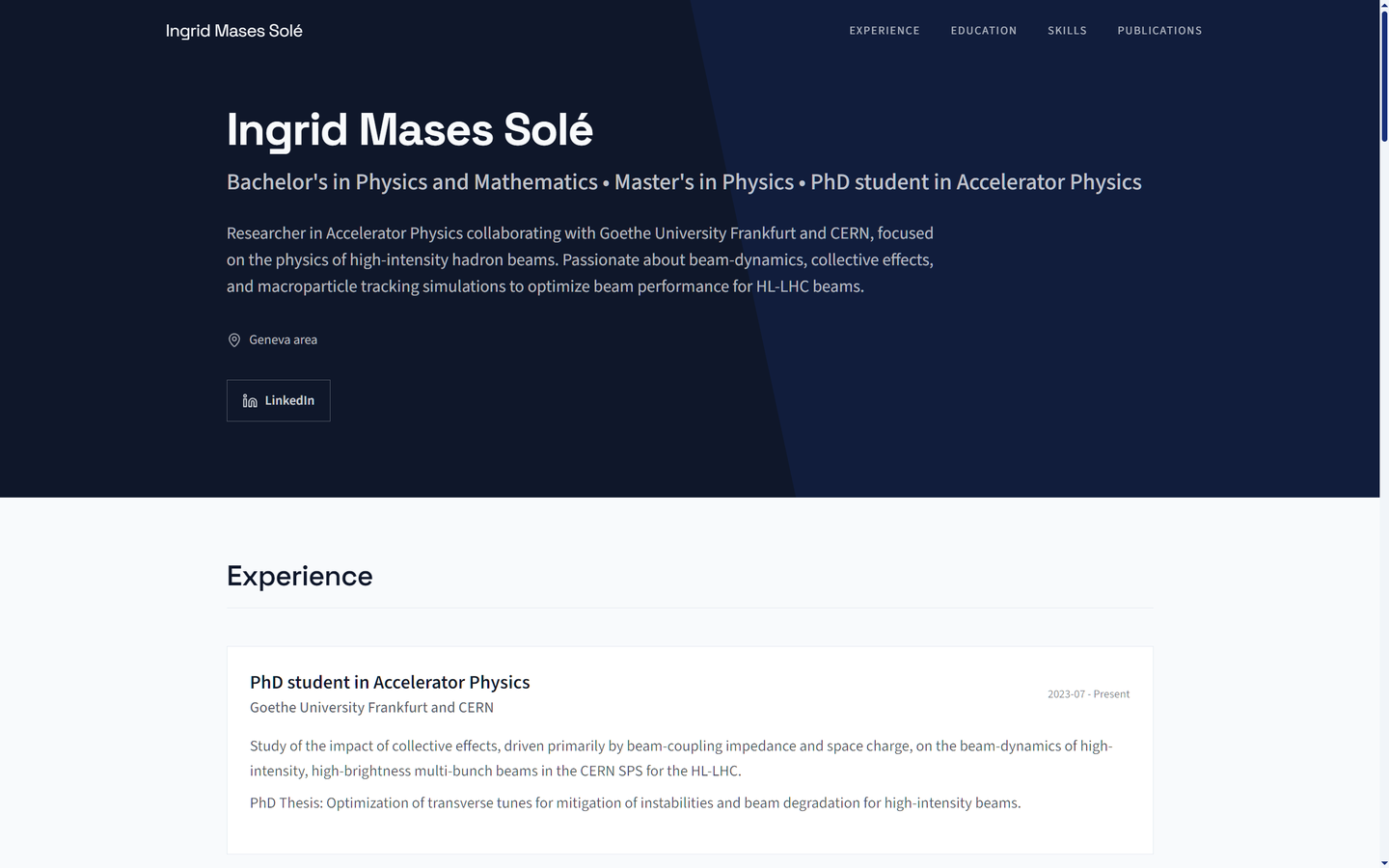
Notice how the sections work together: the introduction establishes a research focus, the experience explains the work, and the publications let readers explore it in depth. The Corporate layout shown here gives that material a consistent professional presentation.
Explore Ingrid's research website and use the following steps to shape your own page.
Step 1: start with your CV and research links
Gather your current academic CV and the public links you want people to open: papers, research software, a project page, or a scholarly profile. Self accepts your existing CV or pasted career text, so you can generate the first version from material you have already written.
Think about what you want the page to help you achieve. For a postdoctoral application, highlight your methods and selected papers. To attract collaborators, lead with the scientific questions and tools you could work on together.
Step 2: write an introduction people can understand
Use your opening to connect your field, the problem you investigate, and the methods you use. Readers from a neighboring discipline should be able to place your work before reaching the specialist detail.
Example introduction based on Ingrid's published research: I research accelerator physics, focusing on how collective effects influence high-intensity beams in the CERN SPS. My work combines beam-dynamics simulations with experimental measurements to study beam performance.
That introduction gives the reader a field, a scientific focus, and an approach. Use the experience section for the detailed research setting and the particular responsibility you held. In Studio, you can refine the wording and choose how much technical depth belongs near the top.
Step 3: connect research experience to publications
For each research role, explain the question, your contribution, and the method. During her traineeship at CERN, for example, Ingrid used simulations to model beam behavior in the SPS and compared the model with experimental measurements. That shows how she used scientific software to answer a research question.
A publication entry can then link directly to the supporting paper. One example on her page is Characterisation of Bunch-by-Bunch Tune Shift Effects in the CERN SPS, published at IPAC 2022. Add the venue and year, and a short explanation of your contribution where useful.
Use selected publications to give a new visitor a starting point. Link to your full scholarly record when a longer bibliography is useful. For a software or data project, explain what it enables and link to the public repository or archive.
Step 4: generate and customize your page in Self
- Upload your CV or paste your research and career text into Self.
- Choose a template and generate your professional page.
- Customize your introduction, experience, publications, and technical skills in Studio. Add project media or links that help explain the work.
- Publish at your self.cv address and share the link in applications, your email signature, and professional profiles.
Corporate, used in Ingrid's example, presents a structured professional overview. Dossier is another option for detailed career histories. You can preview every template. Pro or Team lets you publish with Corporate or Dossier and enable search-engine indexing. Self Free includes a hosted page with a Free template and Self branding.
Create your academic website from your CV or browse templates and examples. See current plan features.
Which GitHub Pages setup steps does Self save?
A template such as Academic Pages starts with a repository and site configuration, followed by adding your content and checking publication. Self generates the professional sections from your CV and gives you Studio for editing and publishing. That leaves more of your effort for explaining the research itself.
You can continue using GitHub for research software and link to it from your Self page. The website introduces your work; each paper, dataset, or repository supplies the detail a reader wants to explore.
For the platform decision, read the Self vs GitHub Pages comparison.
Share a page you can keep current
Before you share your page:
- Keep your affiliation, role, dates, and publication details current.
- Describe your contribution clearly and credit collaborators.
- Use public material and open each paper, project, profile, and contact link.
- Read the introduction on a phone and choose a clear next action for visitors.
Add the link to your CV header, conference bio, and application fields that accept a website. When a paper appears or your role changes, update the relevant section in Studio and publish. Your page can grow with your research while keeping the same address.
Common questions about academic websites
Yes. Self creates a professional website from your academic CV or career text. Choose a template, customize your content in Studio, and publish without working with site files or a repository.
Link to the profiles that help readers explore your work. Give selected papers and projects context on your website, then use Google Scholar or ORCID for your wider research record and GitHub for public code.
Present your research question, relevant education, methods, thesis work, teaching, and public projects. Explain what you personally contributed and give readers a way to contact you. Add publications as they become available.