

Engineering Portfolio: What to Include, With Project Examples
Build an engineering portfolio around your decisions and contributions. Explore mechanical design, testing, and automation examples, plus a reusable project template.

Javier Martínez Samblas
Founder of Self · AI-powered resume-to-website platform

An engineering portfolio makes your work easier to evaluate. It connects a technical problem to the requirements, decisions, and evidence behind your contribution. A clear drawing, a well-explained test, or a documented design change can tell a reader much more than a list of software and responsibilities.
This guide shows what to include, how to structure an engineering project, and how to choose between a PDF and a portfolio website. Three worked examples cover a mechanical component, a measurement exercise, and an automation sequence. Use them to plan your own case studies, then build a page that gives each project the context it deserves.
What is an engineering portfolio?
An engineering portfolio is a selected collection of projects that shows how you approach technical work. It can bring together design studies, prototypes, drawings, tests, calculations, code, and implementation notes. The useful thread is your reasoning: what needed to happen, what you contributed, how you assessed the work, and what you concluded.
Your CV records the roles and qualifications. The portfolio gives selected work enough room to be understood. A hiring manager might use it to explore your decisions, while a technical interviewer may follow a diagram or test result into a more detailed conversation. Build for that conversation by making the first explanation accessible and the supporting detail easy to find.
Choose projects for the engineering role you want
Start with the work the next role requires. A mechanical design application benefits from examples of interfaces, drawings, manufacturing choices, and verification. A test role needs a clear account of the setup and the meaning of the results. For automation, the sequence, interfaces, and handling of abnormal conditions may matter more than a polished product photo.
Mechanical design
Useful project material
CAD views, drawings, prototypes, and design revisions
What to explain
Interfaces, constraints, design choices, and what was checked
Test and instrumentation
Useful project material
Setup diagrams, comparison plots, and test records
What to explain
The question, conditions, measurement approach, and limits of the result
Automation and controls
Useful project material
Sequence diagrams, interface summaries, and test cases
What to explain
Inputs, logic, outputs, recovery behavior, and your responsibility
Manufacturing and industrial engineering
Useful project material
Process maps, layouts, and change records
What to explain
The original process, the change, and evidence of its effect
Software and data engineering
Useful project material
System diagrams, repositories, demos, and evaluation notes
What to explain
Architecture, implementation decisions, testing, and operating context
| Target area | Useful project material | What to explain |
|---|---|---|
| Mechanical design | CAD views, drawings, prototypes, and design revisions | Interfaces, constraints, design choices, and what was checked |
| Test and instrumentation | Setup diagrams, comparison plots, and test records | The question, conditions, measurement approach, and limits of the result |
| Automation and controls | Sequence diagrams, interface summaries, and test cases | Inputs, logic, outputs, recovery behavior, and your responsibility |
| Manufacturing and industrial engineering | Process maps, layouts, and change records | The original process, the change, and evidence of its effect |
| Software and data engineering | System diagrams, repositories, demos, and evaluation notes | Architecture, implementation decisions, testing, and operating context |
Choose a small set of projects with different things to say. Two well-developed examples can be a useful starting point. Add another when it demonstrates a relevant capability the others do not cover. Within team projects, distinguish the overall objective from the part you personally designed, tested, implemented, or coordinated.
What to include in an engineering portfolio
Give the reader a short route through your background and a deeper route into the work. These elements provide a practical foundation for a mechanical engineering portfolio and translate well to other technical disciplines.
- A focused introduction: your field, the kinds of problems you work on, and the role or collaboration you are interested in.
- A project overview: clear titles, a short explanation of each project, and a useful image or diagram.
- Your contribution: the work you owned, the decisions you made, and how you collaborated with others.
- Technical context: requirements, constraints, methods, and the reason for important choices.
- Evidence and status: drawings, test records, approved images, or links, with the stage of the work made clear.
- Results and reflection: what was demonstrated, what remains open, and what you would improve next.
- An easy next step: contact information and a link to your current CV or relevant professional profile.
Example 1: a mechanical design project
For a sensor mounted on an existing test rig, show how the bracket supports the sensor and attaches to the rig. A side cutaway makes the attachment points and tool access easy to follow before the reader opens a detailed drawing.
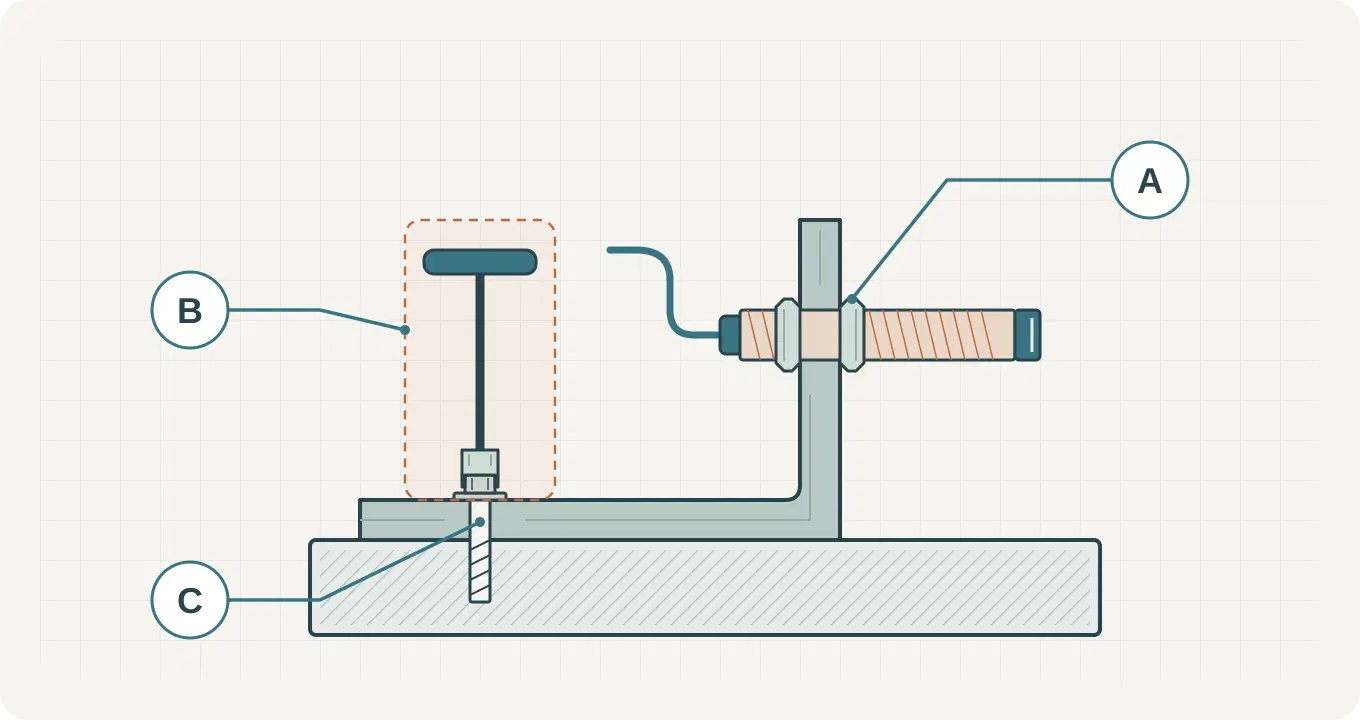
A useful case study starts with the installation context: where the sensor needs to sit, which existing interfaces constrain it, and what access is needed for assembly or adjustment. Then explain your role in developing the concept and checking the design. Keep the detail connected to a decision a reviewer can follow.
- Brief: hold a sensor in a defined position on an existing assembly.
- Constraints to describe: the attachment points, available space, access for tools, and the intended production method.
- Decision to discuss: how you compared a simple bracket with a more complex arrangement, and which requirement guided the choice.
- Evidence to show: an annotated CAD view, a relevant drawing detail, and the checks or prototype observations available for that design stage.
Example project summary: Developed a sensor-mount concept around the existing rig interfaces. Compared layout options, documented assembly access, and prepared the model and drawing for design review.
State the stage of the work precisely: concept, design study, simulation, prototype, or tested part. A CAD study can demonstrate good engineering reasoning on its own. When you have a prototype or test record, connect it to the requirement it addresses and explain what the observation supports.
Example 2: a testing and measurement project
A measurement project becomes understandable when the reader can follow the path from the question to the evidence. For a temperature-sensor comparison, explain what is being compared, how the measurements were captured, and under which conditions the comparison is meaningful. A simple chain diagram can locate each part of the work.
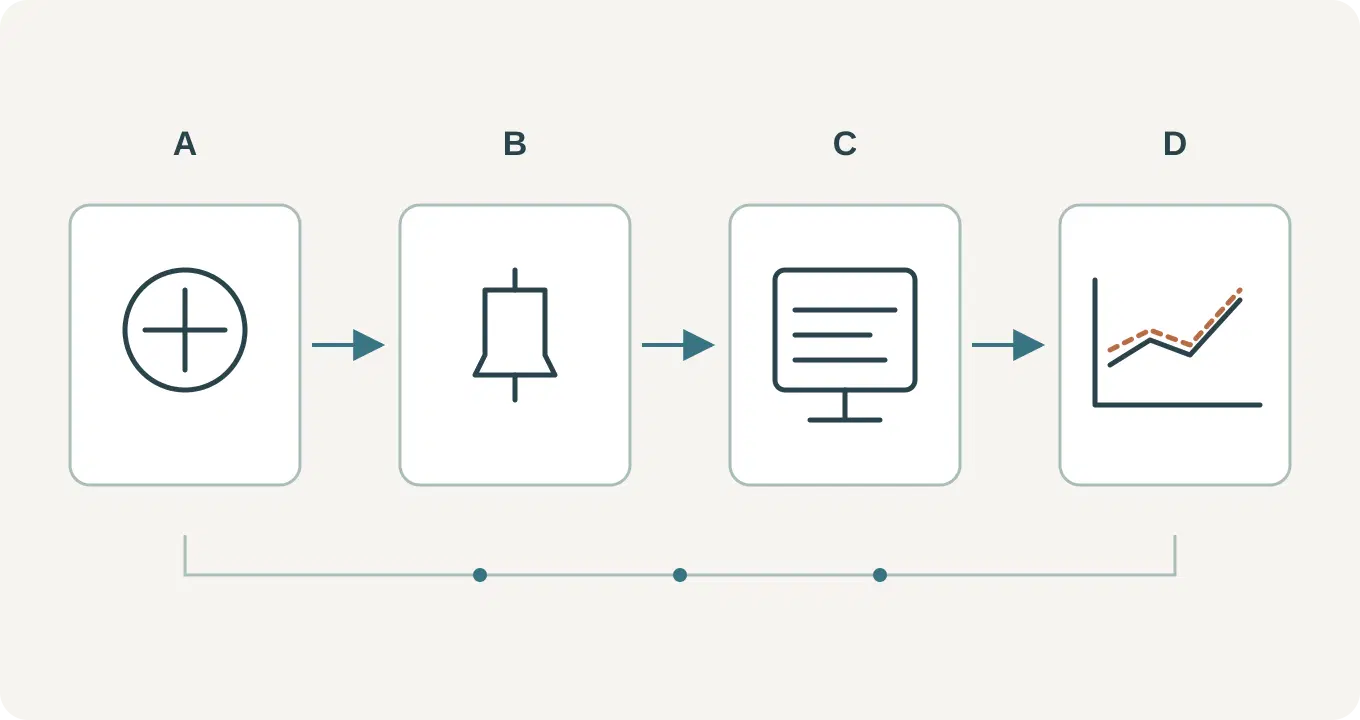
Choose visuals that answer a technical question. A setup photograph identifies the equipment. A diagram explains the connections. A plot shows a comparison over time or across conditions. Label the axes and units, identify the traces, and add a caption that connects your observations to the test question.
- Brief: compare a sensor output with a reference over a defined set of conditions.
- Your contribution: describe the setup, acquisition work, analysis, or documentation you personally completed.
- Evidence to show: the measurement chain, test conditions, a selected plot, and the record that explains how the comparison was made.
- Conclusion to discuss: what the observations support within the tested conditions and which questions remain open.
Example project summary: Documented a temperature-sensor comparison from the measurement setup to the analysis. Explained the reference, acquisition method, and test conditions, then connected each conclusion to the available observations.
Use the project target to frame your analysis, then explain the measured result and what you learned. An unexpected trend or a gap in the dataset can lead naturally into the next test or design change.
Example 3: an automation and controls project
For a small sorting or handling sequence, a finished-system image gives only part of the story. A reader also needs to understand what the system receives, how the logic uses that information, and which outputs follow. A separate path for abnormal conditions makes the explanation more complete.
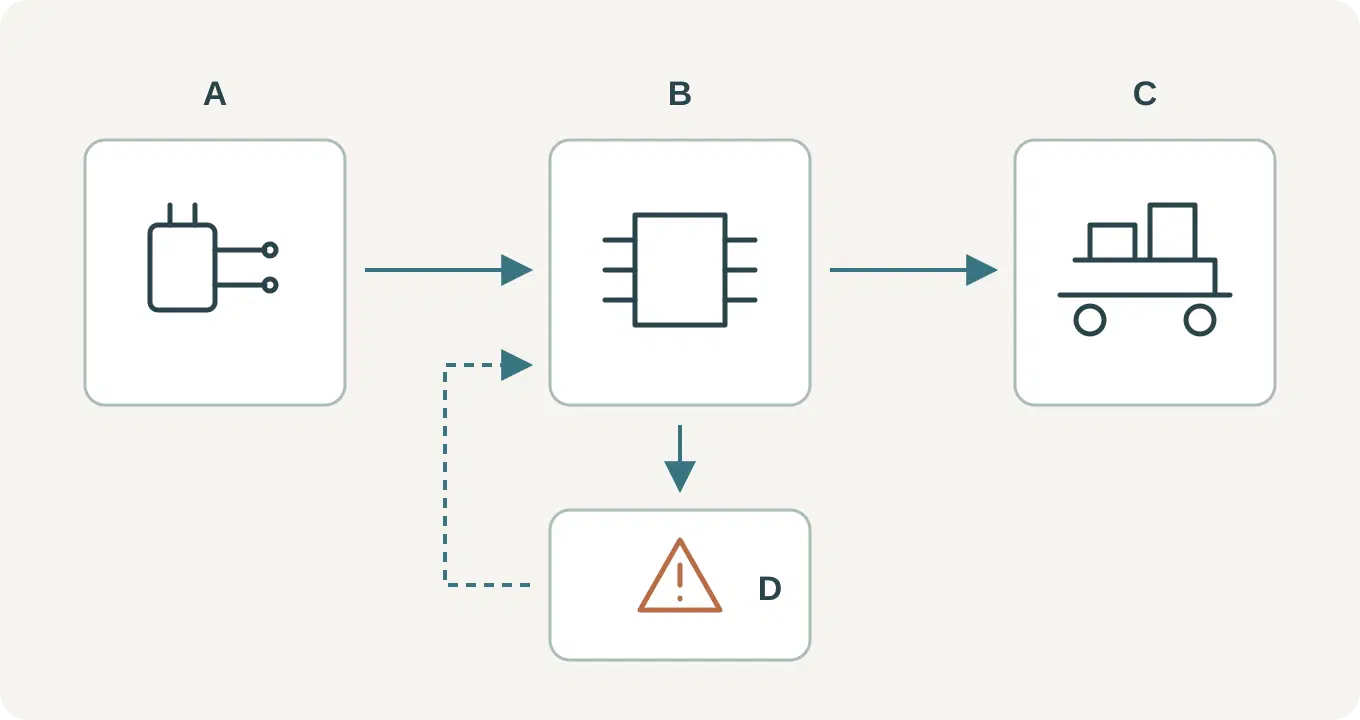
Introduce your role and the part of the system you worked on. You may have developed the control sequence, connected an interface, written test cases, or documented the handover. Relate one important decision to its consequence: for example, how an absent input changes the sequence or which information the operator needs before restarting.
- Brief: coordinate an input-driven sequence with a defined operating objective.
- Interfaces to describe: relevant sensors, operator actions, software signals, and outputs.
- Evidence to show: a sequence or state diagram, a readable logic excerpt, and test cases with observed behavior.
- Handover to explain: operating assumptions, known limitations, and the documentation or guidance you produced.
Example project summary: Developed and documented a handling sequence linking sensor inputs, control logic, and outputs. Prepared test cases for normal operation and interrupted sequences, and recorded the behavior observed during the exercise.
Set the scene for your results: a bench demonstration, a prototype trial, or commissioning in an operating environment. Describe the setup, the conditions you tested, and the behavior you observed. These details give an interviewer a clear starting point for discussing your contribution.
An engineering portfolio template you can reuse
Use this outline for each project. Write a short first version from your own notes, then add the drawings, photos, or links that support it. The first paragraph should give enough context for a general reader; technical detail can follow in the supporting material.
- Project title and date: name the system, component, or problem.
- Objective: what needed to be designed, understood, improved, or demonstrated?
- Context and constraints: where would the work be used, and which requirements shaped it?
- My contribution: what did I personally own, produce, decide, or coordinate?
- Approach: which options did I consider, and why did I choose this method?
- Evidence: which drawing, diagram, image, test record, or repository supports the explanation?
- Result and status: what was completed or observed, and at what stage of development?
- Reflection: what remains uncertain, and what would I do next?
Choose the format that serves each project. A mechanical design may need an overview and a drawing detail; a testing exercise may need a measurement diagram and a readable plot. Every visual should help answer a question. Give captions enough context to make sense outside the original report.
Engineering portfolio PDF or website?
Choose according to how the work will be reviewed. A PDF gives you a fixed selection you can attach, print, or tailor for a particular application. A website gives you a shareable address and room to connect project summaries, images, and supporting links. You can maintain both from the same project notes.
An application requests a file
Prepare a focused document in the requested format.
Website
Add the link where the application allows supporting material.
An interview needs a project discussion
Use a short selection with readable drawings and figures.
Website
Open the relevant project and follow links when useful.
You want to share the portfolio in several places
Send the version appropriate to that audience.
Website
Share the same address in your CV, profile, or email.
The project develops over time
Export a new version and keep its date clear.
Website
Update the explanation and supporting links on the page.
| Situation | Website | |
|---|---|---|
| An application requests a file | Prepare a focused document in the requested format. | Add the link where the application allows supporting material. |
| An interview needs a project discussion | Use a short selection with readable drawings and figures. | Open the relevant project and follow links when useful. |
| You want to share the portfolio in several places | Send the version appropriate to that audience. | Share the same address in your CV, profile, or email. |
| The project develops over time | Export a new version and keep its date clear. | Update the explanation and supporting links on the page. |
A professional engineering portfolio can be concise in either format. Give the reader a clear route into the work and keep the presentation appropriate to the material. Detailed files can support the main explanation when you are able to share them.
Build your engineering portfolio website with Self
Self turns your CV, project notes, and professional material into a hosted website. Start with a short introduction and selected projects, choose a design, and review how the material is organized. Add project images and useful links so the page connects your career history to work a visitor can explore.
For CAD work, prepare readable images or drawings exported from your engineering tools. Explain the context in the project description and link to a fuller report or repository when appropriate. The website is the presentation layer for the evidence you have prepared.
Compare the website templates and examples or explore the personal website design guide. Dossier can suit a detailed technical chronology, while Bento separates profile information into clear blocks. Preview every design; Free supports publishing with Free templates, and Pro or Team unlock publication with Pro designs.
Start with the resume-to-website tool and follow the complete resume website workflow for uploading, reviewing, and publishing your page.
Engineering portfolio questions
How many projects should an engineering portfolio include?
Start with a few projects you can explain well. Two or three can cover meaningful ground when each demonstrates a different relevant skill. Add work when it improves the picture of your capability, and choose the selection for the role or conversation.
What can I include without professional experience?
Use coursework, a capstone project, a laboratory exercise, a competition, or a self-directed build. Explain the context, your contribution, and the actual stage of the work. Our guide to turning university coursework into portfolio projects develops that process.
How do I present work I cannot share publicly?
Use approved public material and describe only the scope you are allowed to discuss. When project details are unavailable, an independent project can demonstrate a related method or skill. Choose evidence whose sharing status is clear before adding it to a public page.
Should I include a project that did not reach its original target?
It can be useful when you explain the target, the work completed, the observed result, and the next step. A clear account of a technical limitation or a design revision can demonstrate how you investigate and make decisions.