

How to Build a Resume Website in 2026: Step-by-Step Guide
Build a useful resume website with a clear audience, credible evidence, responsive design, and a publishing method that fits your time and skills.

Javier Martínez Samblas
Founder of Self · AI-powered resume-to-website platform
A strong resume website in 2026 starts with a clear audience and a specific purpose. Decide who should visit it, select the evidence that matters to that person, organize the material into a focused page, make sure it works properly on phones, and publish it at a professional address. You can write the site yourself, assemble it with a general website builder, or upload the resume or CV you already have to Self and generate the website in under one minute. All three routes can produce a live page, but they demand radically different amounts of time, technical ability, design judgment, and tolerance for spending an evening arguing with a navigation menu.
A resume website is not a PDF stretched across a browser window and it is not LinkedIn wearing a nicer font. It is a focused professional page that helps a recruiter, client, collaborator, or search result understand what you do and why your work is credible. The best version complements the document you submit to employers. Your resume remains the compact, conventional file that application systems expect, while the website gives your projects, achievements, media, links, and personality enough room to be persuasive.
Choose your building method without lying to yourself
The right tool depends less on what is theoretically possible than on what you can finish, maintain, and confidently show. Coding offers the most control. A general website builder removes the programming but leaves most design and content decisions with you. Self begins with the professional information already organized in your resume and produces the site structure and design automatically. The honest comparison is not between freedom and laziness. It is between three different uses of limited time.
Code it yourself
What you need
Frontend skills, design judgment, hosting knowledge, and maintenance
Typical effort
Days for a polished first version, then ongoing upkeep
Best fit
Programmers who want full control or need the site itself to demonstrate technical ability
Use a website builder
What you need
Visual judgment, patience, copywriting, and willingness to configure many small details
Typical effort
Several focused hours, often more once mobile layout and revisions begin
Best fit
Design-oriented users who want manual control without writing code
Generate it with Self
What you need
The resume or CV you already have and a brief review before publishing
Typical effort
A generated first version, followed by optional review and editing
Best fit
Professionals who want a credible site without turning website production into a second career
| Method | What you need | Typical effort | Best fit |
|---|---|---|---|
| Code it yourself | Frontend skills, design judgment, hosting knowledge, and maintenance | Days for a polished first version, then ongoing upkeep | Programmers who want full control or need the site itself to demonstrate technical ability |
| Use a website builder | Visual judgment, patience, copywriting, and willingness to configure many small details | Several focused hours, often more once mobile layout and revisions begin | Design-oriented users who want manual control without writing code |
| Generate it with Self | The resume or CV you already have and a brief review before publishing | A generated first version, followed by optional review and editing | Professionals who want a credible site without turning website production into a second career |
Step 1: define the audience and one clear promise
Begin the actual build with one audience and one promise. A software engineer might want a hiring manager to see production experience and technically serious projects, while a consultant might want prospective clients to recognize a narrow specialty and find a credible contact route. Write a headline that combines your role with a useful specialization or result, then add a short introduction explaining the work you do, the context in which you do it, and what you want next. A recruiter does not arrive hoping to solve a biographical escape room.
The opening area should state your name, professional role, distinctive expertise, and the action a visitor can take next. 'Backend engineer building reliable payment systems' is useful positioning. 'Passionate professional leveraging innovative solutions to drive meaningful impact' is vapor from a malfunctioning corporate kettle. Match the call to action to the audience: contact and a resume download for a job seeker, a project inquiry for a freelancer, or publications and collaboration details for a researcher.
Step 2: select evidence instead of copying everything
Review the resume and mark the roles, achievements, and projects that support the goal. Keep the chronological facts accurate, but give the most relevant material more explanation and compress work that no longer affects the decision. A public website is allowed to be selective. It should not falsify history, but it also does not owe equal screen time to the summer job you held fifteen years ago and the program you led last quarter.
Turn the strongest claims into evidence. Add a link to the product, publication, repository, talk, campaign, or organization when it is public. Use an image or video when seeing the work improves understanding. State measurements with the context needed to make them credible, and be precise about your own contribution to team results. If the work is confidential, explain the problem, constraints, approach, and outcome at a level your agreement permits instead of replacing the missing evidence with larger adjectives.
Introduction
What it must accomplish
Identify your role, specialty, and intended next step
Common mistake
Opening with a generic objective that could describe thousands of candidates
Experience
What it must accomplish
Show ownership, scope, and the outcome of relevant work
Common mistake
Copying every duty from the resume without priorities or results
Projects or proof
What it must accomplish
Make important claims inspectable through context, media, or links
Common mistake
Showing screenshots or titles without explaining your contribution
Skills and credentials
What it must accomplish
Support the target direction with relevant capabilities and qualifications
Common mistake
Publishing an exhaustive inventory with no connection to evidence
Contact and resume
What it must accomplish
Provide a safe contact route and an optional downloadable document
Common mistake
Publishing private details or making the embedded PDF the entire website
| Section | What it must accomplish | Common mistake |
|---|---|---|
| Introduction | Identify your role, specialty, and intended next step | Opening with a generic objective that could describe thousands of candidates |
| Experience | Show ownership, scope, and the outcome of relevant work | Copying every duty from the resume without priorities or results |
| Projects or proof | Make important claims inspectable through context, media, or links | Showing screenshots or titles without explaining your contribution |
| Skills and credentials | Support the target direction with relevant capabilities and qualifications | Publishing an exhaustive inventory with no connection to evidence |
| Contact and resume | Provide a safe contact route and an optional downloadable document | Publishing private details or making the embedded PDF the entire website |
Step 3: organize the page around the visitor's questions
A reliable order is introduction, selected proof, relevant experience, supporting credentials, and contact. The exact sequence can change with the profession. A designer or developer may place projects before employment history, while an executive may lead with scope and career outcomes. A recent graduate may use substantial projects and education to establish potential before listing limited experience. Structure the page according to what the visitor needs to believe next, not according to the order of fields in an old word-processing template.
Most resume websites do not need a maze of separate pages. A well-organized one-page site is often easier to explore, easier to maintain, and better suited to a visitor arriving from a job application. Separate project case studies, articles, or publication archives are valuable when the material genuinely needs depth, but every additional page should answer a question that could not be handled clearly on the main profile.
Step 4: write for humans who are short on time
Use direct language, concrete nouns, and active verbs. Replace responsibility lists with accounts of ownership and effect. 'Responsible for social media' tells the reader that an account existed nearby. 'Planned and ran a six-month campaign that increased qualified demo requests by 31 percent' explains action, duration, and result. Not every accomplishment needs a number, but every important sentence should help the reader understand your ability, judgment, or direction.
Keep professional terminology when the intended audience understands it, and explain it when they may not. The goal is clarity, not the removal of all complexity. Avoid generic AI-generated language unless you have edited it until it sounds like a real person with a real career. Your actual decisions, constraints, mistakes, and outcomes are more distinctive and persuasive than another paragraph about being a results-driven visionary.
Step 5: design for reading before admiration
A professional resume website needs readable typography, visible hierarchy, sufficient contrast, generous spacing, consistent alignment, and restrained use of color. It does not need a preloader, a custom cursor, background music, or an animation that makes the visitor chase your experience around the screen. Creative work can justify a more expressive presentation, but that expression should clarify the person and the work rather than obscure both.
Design mobile-first or at least test mobile throughout the process. Buttons must be large enough to use, text should not require zooming, images must crop deliberately, and navigation should remain understandable without hover. Compress large media, reserve space to prevent layout shifts, and verify the page on more than the expensive laptop used to build it. A recruiter opening the link between meetings on an ordinary phone is not an edge case. That person may be the primary audience.
Step 6: choose a professional web address
A short platform address is perfectly reasonable when launching quickly, particularly if it is readable and associated with a professional service. A custom domain can strengthen recognition and give you a durable address, usually based on your name or professional identity. Keep it easy to spell, avoid decorative punctuation and unexplained numbers, and say it aloud before buying it so the address remains easy to share in conversation as well as in writing.
A domain is valuable only when it points to a maintained website. Configure HTTPS, choose the preferred version of the address, and keep renewal details current. Self users who want a personal address can follow the built-in publishing flow and connect a custom domain without rebuilding the site or moving the career information into another system.
Step 7: add the search and sharing basics
Give the page a descriptive title that includes your name and professional role, then write a concise description that tells searchers what they will find. Use one clear main heading, logical subheadings, descriptive link text, and alternative text for meaningful images. Add a social sharing image so the link looks intentional when posted or sent in a message. If you control the technical implementation, also set canonical metadata and structured data accurately, but do not treat schema markup as a magical incantation that compensates for thin content.
Your name, role, location when professionally relevant, and areas of expertise should appear naturally in visible text. Repeating the same target phrase does not make the page more authoritative or useful. Search visibility grows from clear content, credible evidence, sensible metadata, legitimate links, and consistent professional information across your website and public profiles.
Step 8: review, publish, and keep it alive
Before publishing, check every date, employer, qualification, link, spelling of a name, and numerical claim against the source material. Open every button, submit the contact route if there is a form, inspect the phone layout, test keyboard navigation, and ask one person in the intended audience to explain what they think you do after a brief visit. Their answer is more useful than asking whether they 'like the design,' a question that reliably produces politeness and no information.
Once the site is live, place the link in the resume header, LinkedIn contact information, email signature, professional profiles, and application fields that accept a portfolio or personal website. Review it whenever your resume changes and at least every few months during an active search. A website containing a role you left two years ago and a contact form that quietly died during a platform migration is not a professional asset. It is a small museum of abandoned intentions.
How the three building methods work in practice
The comparison table gives the quick decision, but the hidden effort matters when choosing a route. Coding is appropriate when implementation is part of the evidence. A general builder suits people who want manual visual control. Self is designed for professionals whose priority is the finished website rather than the process of constructing one.
Option 1: code the resume website from scratch
Building from scratch is sensible when programming is part of the work you want to demonstrate or the website needs behavior that ordinary tools cannot provide. A simple static site can use semantic HTML, modern CSS, and a small amount of JavaScript, while a more elaborate version might use Next.js or Astro, a content layer, image optimization, analytics, automated deployment, and a custom domain. Every addition also creates another dependency that can age, break, or demand maintenance.
Use semantic sections, descriptive links, meaningful alternative text, sufficient contrast, keyboard-accessible controls, and a reading order that works without visual styling. Test narrow mobile widths early, then handle the work tutorial screenshots often omit: metadata, social sharing images, canonical URLs, performance, browser testing, HTTPS, domain configuration, dependency updates, and a practical way to edit the content later.
Developers sometimes answer those requirements by building a miniature content management system for a website containing one person. This is impressive in the same way that manufacturing your own toaster is impressive. If you take the code route, make the clean implementation part of your evidence, but keep the website fast and understandable. The visitor still came to assess your work, not the number of services required to display your name.
Option 2: use a general website builder
A website builder removes deployment code and combines templates, visual controls, hosting, and domain connections. You still need to choose the template, replace demonstration content, decide the hierarchy, write and edit the copy, import images, configure buttons, adjust spacing, prepare the mobile layout, set metadata, connect the domain, and publish. Designers can use that control to produce excellent work, but people without design experience must make the same decisions without the training that makes them easy.
Begin with the simplest suitable resume or portfolio template, finish the complete content before refining visual details, and check pricing for custom domains, removal of platform branding, analytics, forms, storage, and future export. General builders are capable, but their abundance of options can turn a focused professional page into an extended exercise in layout decisions and subscription comparison.
Option 3: turn your existing resume into a website with Self
For most job seekers and working professionals, the best alternative is to start with the career document that already exists. Upload your resume or CV to Self's resume-to-website builder, and Self extracts the professional information, organizes it into a responsive website, applies a purpose-built design, and gives you a site to review in under one minute.
Starting automatically does not mean surrendering control. You can review imported facts, change the emphasis, edit the writing, choose a different template, add project media, update links, and refine the page after generation. Editing begins from a coherent working website instead of a blank canvas. A blank canvas is romantic when you are Picasso. When a job application is due on Tuesday, it is mostly a large white rectangle making accusations.
Self already understands experience, education, skills, projects, languages, links, and the other information found in a resume. Its layouts are responsive, hosting and publishing are part of the workflow, and you can keep a Self address or connect a custom domain when your plan supports it. That makes Self the strongest route when the desired outcome is a professional resume website, rather than the educational project of becoming a frontend developer or the design project of constructing every section manually.
A concrete example: Anna Smith's resume website
Anna Smith is the fictional marketing lead in Self's Aurora example. Her profile connects brand strategy, product launches, and lifecycle marketing, including a 28 percent increase in marketing-sourced qualified pipeline in 2024 compared with 2023 while paid media spend stayed flat. The page organizes those example career facts into a clear introduction, experience, selected projects, and supporting credentials.
Name, headline, summary, location, and professional links
Website treatment
A focused opening profile with immediate contact routes
Why it helps the visitor
The visitor understands Anna's role and positioning before exploring details
Marketing roles, dates, responsibilities, and measurable achievements
Website treatment
A readable experience timeline that keeps outcomes attached to each role
Why it helps the visitor
Claims such as pipeline growth retain their professional context
Lifecycle automation project, tools, certifications, and languages
Website treatment
Dedicated proof and supporting sections with media and links where useful
Why it helps the visitor
The page moves beyond chronology and shows the capabilities behind the headline
| Resume source | Website treatment | Why it helps the visitor |
|---|---|---|
| Name, headline, summary, location, and professional links | A focused opening profile with immediate contact routes | The visitor understands Anna's role and positioning before exploring details |
| Marketing roles, dates, responsibilities, and measurable achievements | A readable experience timeline that keeps outcomes attached to each role | Claims such as pipeline growth retain their professional context |
| Lifecycle automation project, tools, certifications, and languages | Dedicated proof and supporting sections with media and links where useful | The page moves beyond chronology and shows the capabilities behind the headline |
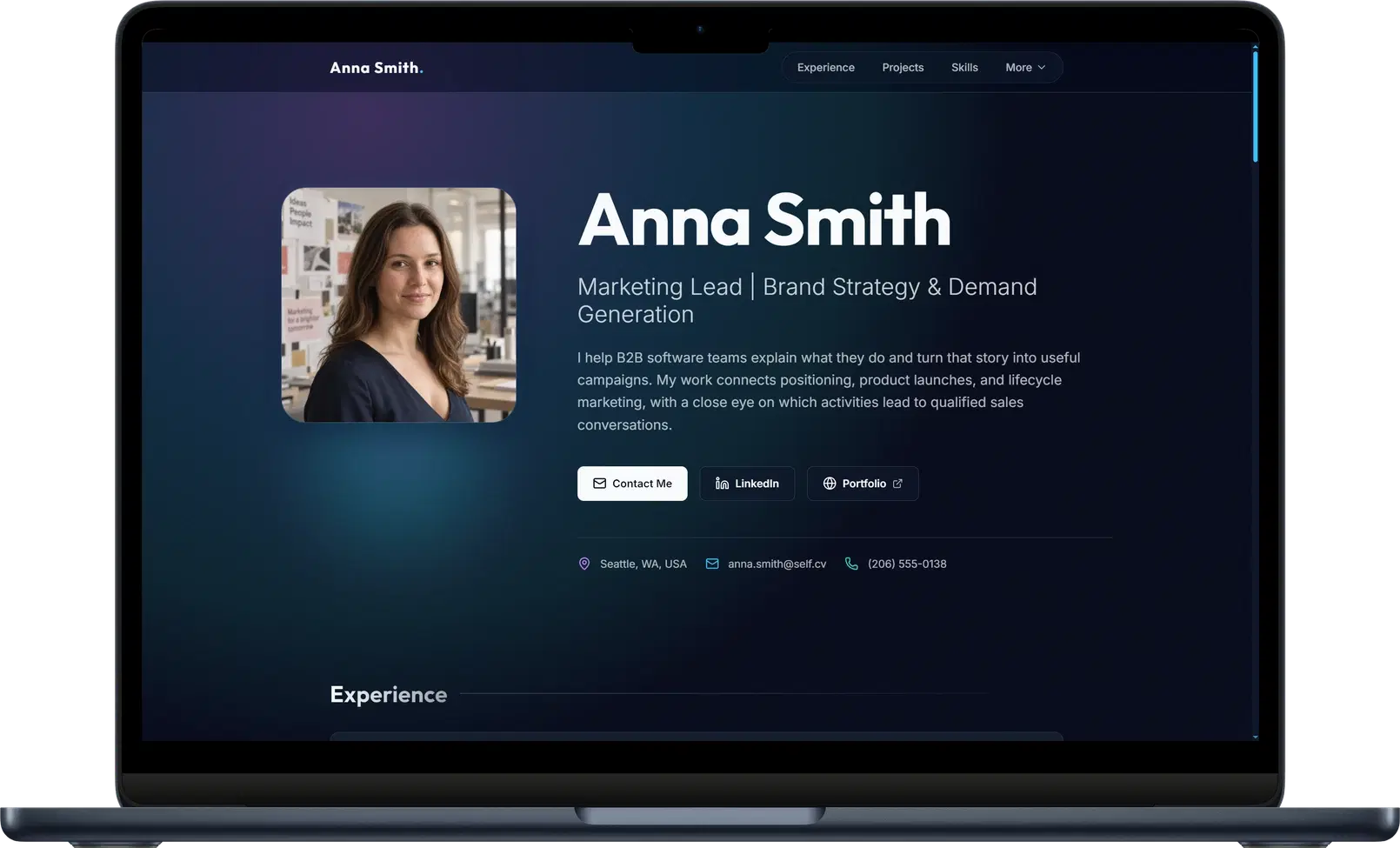
Generation creates the useful starting point, and the editor handles the judgment that follows. The live preview lets you inspect the result as a visitor would, update content, switch templates or styles, add project material, and publish without leaving the same workflow.
Keep the resume and website working together
The website should not replace the resume in application systems that explicitly request a document. Keep a clean, ATS-friendly file for submission and use the website to add depth, proof, and memorability. If you are still deciding what deserves space in the document, the one-page resume guide explains how to preserve the application essentials while moving richer material to the web.
Facts should remain consistent across both formats, but presentation does not need to be identical. The resume can compress older roles and use plain formatting for dependable parsing. The website can show project images, link to work, explain decisions, include testimonials, and adapt to different screens. Put the website address near the top of the resume so the document leads an interested reader toward the stronger experience instead of hoping they search your name and choose the correct result.
The best route is the one that gets a strong site published
Coding a resume website can be worthwhile for a programmer whose implementation is part of the portfolio. A general builder can suit a designer who wants close visual control and is prepared to spend the time. For everybody else, those routes often transform a straightforward professional need into unpaid training in responsive layout, hosting, typography, subscription comparison, and the emotional politics of button padding.
If you already have a resume or CV, Self removes the least valuable part of the work. Upload the file, let Self turn it into a responsive professional website in under one minute, review the result, and publish when it represents you accurately. You can browse resume website templates and examples before choosing the presentation that suits your work, then edit the content instead of rebuilding it from a blank page.
That is the practical answer to how to build a resume website in 2026. Decide what the site must communicate, use evidence rather than slogans, protect private information, make the experience clear on every screen, and choose a production method proportionate to the outcome. The visitor cares about your work, not how heroically you suffered while configuring the website. Self lets the career remain the difficult and interesting part, which is where the effort belonged all along.